


In a world where distractions are constant and time feels like a fleeting resource, efficiency isn’t just a buzzword—it’s a survival skill. We’ve all been there: staring at a screen, juggling a dozen tasks, yet feeling like we’ve accomplished nothing. The irony? The tools to fix this are often right at our fingertips, yet we overlook them in favor of complexity. What if the key to unlocking your productivity isn’t more effort, but smarter choices?
Efficiency isn’t about working harder; it’s about working smarter. The right tools can transform chaos into clarity, turning overwhelming to-do lists into manageable steps. But here’s the catch: not all tools are created equal. Some are bloated with features you’ll never use, while others are so simple they feel almost too good to be true. The tools that truly stand out are the ones that align with how your brain naturally operates—intuitive, adaptable, and designed to eliminate friction.
Below, we’ve curated 10 tools that do more than just promise productivity; they deliver it. These aren’t just apps or gadgets—they’re catalysts for a fundamental shift in how you work. Whether you’re a freelancer drowning in deadlines, a student buried under textbooks, or a professional racing against the clock, these tools can help you reclaim control. Let’s dive in.
—
The Digital Swiss Army Knife: Notion
Imagine a single platform where you can plan projects, take notes, manage databases, and even track your habits—all without toggling between a dozen apps. That’s Notion, the ultimate all-in-one workspace. What makes it revolutionary isn’t just its versatility, but its adaptability. You can start with a simple to-do list and evolve it into a full-fledged project management system as your needs grow.
Notion’s magic lies in its flexibility. Its block-based system lets you drag and drop elements, whether you’re outlining a blog post, tracking client feedback, or organizing your personal goals. The real game-changer? Databases. With a few clicks, you can turn a list of tasks into a Kanban board, a calendar, or a spreadsheet—all synced in real time. It’s like having a digital Swiss Army knife, but instead of blades, you get clarity.

—
The Time-Traveler’s Secret: Toggl Track
We’ve all lost hours to “quick” tasks that somehow stretch into eternity. The culprit? A lack of awareness. Toggl Track fixes that by turning time into a tangible asset. This simple time-tracking tool does one thing exceptionally well: it helps you see where your time *actually* goes. No more guessing. No more “I swear I worked on this for hours” delusions.
What sets Toggl apart is its effortless integration into your workflow. A single click starts a timer, and it works across devices—desktop, mobile, even browser extensions. The reports are clean and actionable, highlighting patterns in your productivity (or lack thereof). The deeper insight? Time tracking isn’t just about accountability; it’s about identifying your most productive hours and protecting them like gold. Once you see how much time certain tasks *really* take, you’ll start making smarter choices about what deserves your focus.

—
The Invisible Assistant: Otter.ai
Meetings, lectures, interviews—life is full of conversations that vanish the moment they’re spoken. Otter.ai changes that by turning speech into searchable, shareable text in real time. It’s like having an invisible stenographer at your disposal, capturing every word so you can focus on the discussion, not the note-taking.
The brilliance of Otter lies in its accuracy and accessibility. It doesn’t just transcribe; it identifies speakers, timestamps key points, and even generates summaries. Need to revisit a crucial detail from a client call? Search for it in the transcript. Forgot to jot down an action item? Otter’s got you covered. The deeper benefit? It frees your mental bandwidth. Instead of scrambling to keep up, you can engage fully in the conversation, knowing the details are safely stored for later.

—
The Focus Architect: Freedom
Distractions aren’t just interruptions—they’re productivity killers. Freedom tackles this by blocking distracting websites and apps across all your devices. But it’s more than just a blunt instrument; it’s a precision tool for focus. You can schedule sessions in advance, sync blocks across your phone and laptop, and even set recurring “focus hours” to train your brain into a distraction-free zone.
The psychology behind Freedom is fascinating. By removing the temptation to check social media or news sites, it forces you to confront the root of procrastination: the inability to resist immediate gratification. Over time, this builds discipline. The deeper effect? It rewires your relationship with technology. Instead of being a slave to notifications, you become the master of your attention.

—
The Collaboration Catalyst: Slack
Email is a relic of a bygone era—slow, cluttered, and prone to miscommunication. Slack modernized team communication by organizing conversations into channels, threads, and direct messages. It’s not just a messaging app; it’s a productivity multiplier. Need to share a file? Drag and drop. Want to brainstorm with a colleague? Start a thread. Need to search for an old discussion? Slack’s search function is a lifesaver.
The real magic of Slack lies in its integrations. Connect it to Google Drive, Trello, or Zoom, and suddenly, your workflow becomes seamless. But the deeper advantage is cultural. Slack reduces the noise of email, fosters transparency, and encourages asynchronous communication—meaning you can respond when it suits you, not when an email demands it. The result? Less stress, more focus, and fewer “reply-all” disasters.

—
The Automation Alchemist: Zapier
Repetitive tasks are the silent productivity killers. They eat up time, drain energy, and offer zero creative reward. Zapier changes that by automating the mundane. Need to save email attachments to Dropbox? Zapier does it. Want to add new leads from a form to your CRM? Zapier handles it. The possibilities are endless, and the time savings are staggering.
The beauty of Zapier is its simplicity. You don’t need to be a coder to set up “Zaps” (automated workflows). The platform’s drag-and-drop interface makes it accessible to anyone. But the deeper impact is on your mental energy. By offloading repetitive tasks, you free up cognitive space for high-value work. It’s not just about efficiency; it’s about reclaiming your creativity.

—
The Mind-Mapping Maestro: Miro
Brainstorming is where great ideas are born—but only if you can organize the chaos. Miro is a digital whiteboard that turns messy brain dumps into structured, visual plans. Whether you’re mapping out a project, designing a workflow, or sketching a new product, Miro’s infinite canvas adapts to your thinking style.
What makes Miro stand out is its collaborative power. Teams can work together in real time, adding sticky notes, diagrams, and images to a shared space. The deeper benefit? It forces clarity. When ideas are laid out visually, gaps and connections become obvious. It’s like giving your brain a mirror—suddenly, the path forward is illuminated.

—
The Energy Optimizer: Forest
Productivity isn’t just about tools—it’s about mindset. Forest gamifies focus by turning your phone into a virtual tree. Plant a seed, and it grows into a tree as long as you stay off your device. If you leave the app, your tree withers. It’s a simple concept with profound effects: it trains you to stay present and resist the urge to check your phone.
The psychology here is brilliant. By associating focus with growth (literally), Forest makes productivity feel rewarding. Over time, it rewires your habits, teaching you to associate deep work with positive outcomes. The deeper insight? True efficiency isn’t about doing more—it’s about doing better.

—
The Knowledge Architect: Obsidian
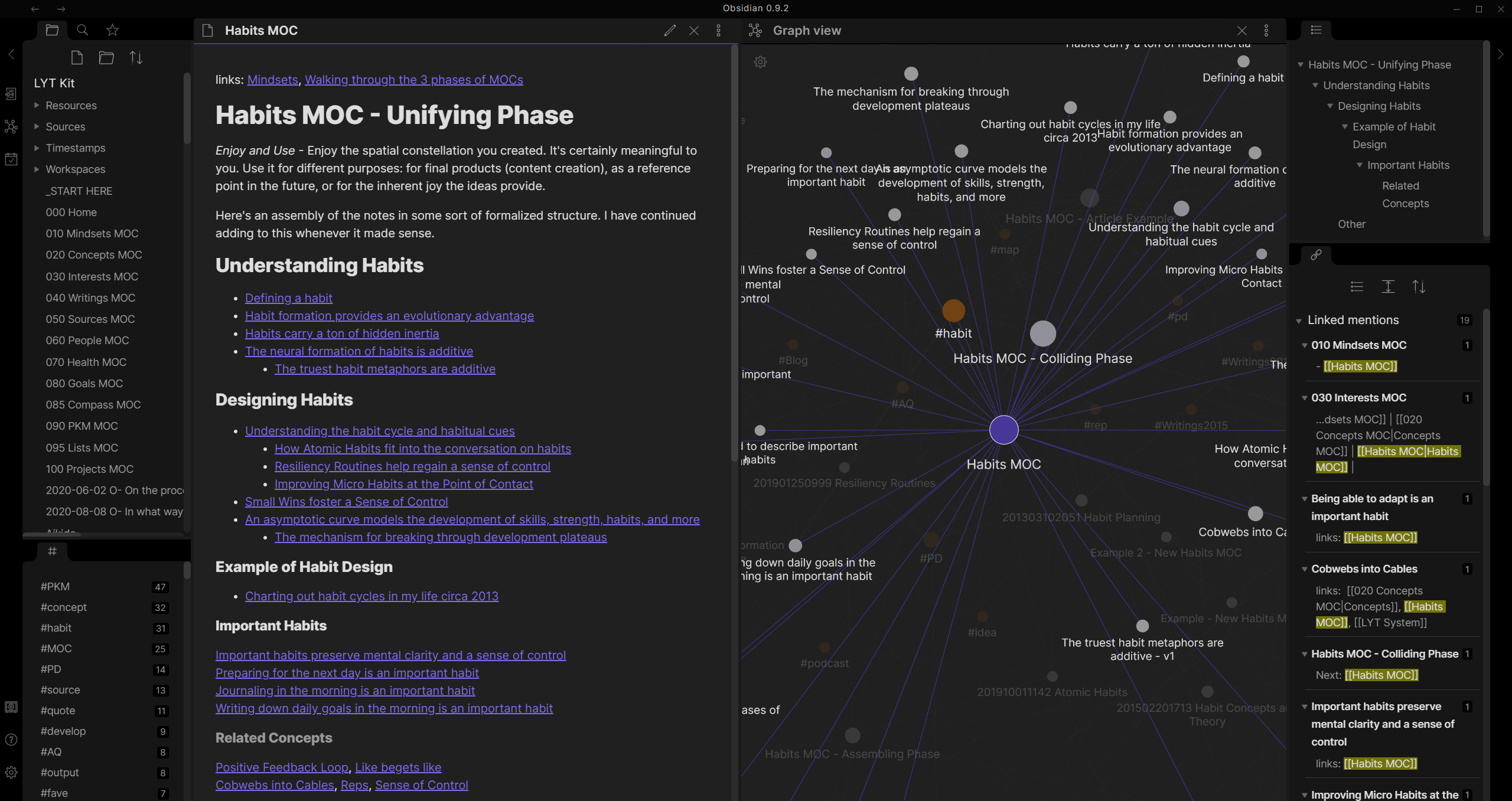
In the age of information overload, the ability to organize knowledge is a superpower. Obsidian is a note-taking app that turns your thoughts into a connected web of ideas. Unlike traditional note apps, Obsidian links notes together, creating a second brain that grows with you. Need to revisit a concept from months ago? A quick search reveals its connections.
The real magic of Obsidian is its markdown-based simplicity. No bloated features, no forced hierarchies—just pure, unstructured thinking. The deeper benefit? It encourages long-term retention. By linking ideas, you create mental models that stick. It’s not just a note-taking tool; it’s a thinking tool.
—
The Final Piece: You
Tools are powerful, but they’re only as effective as the habits you build around them. The most efficient people aren’t those with the fanciest apps—they’re those who use tools intentionally. Start small. Pick one tool that addresses your biggest pain point, master it, then layer in others. Over time, you’ll notice something remarkable: the chaos isn’t gone, but your ability to navigate it has transformed.
Efficiency isn’t a destination; it’s a practice. And the best tools? They don’t just save time—they give it back to you.
Leave a comment