


In the fast-paced world of business, a well-structured workflow isn’t just a luxury—it’s a necessity. Yet, too many organizations build workflows reactively, piecing together processes as challenges arise. The result? Inefficiencies, bottlenecks, and a disconnect between strategy and execution. A strategy-first workflow flips this script. It starts with a clear vision, aligns every step with overarching goals, and ensures that every task—no matter how small—drives meaningful progress. This guide breaks down how to design, implement, and refine a workflow that doesn’t just keep up with your business but propels it forward.
—
The Foundation: Why Strategy Must Lead Your Workflow
Before diving into tools or templates, it’s critical to understand the philosophical shift that separates a reactive workflow from a strategy-first one. A reactive workflow is like a ship without a rudder—it moves, but not necessarily in the right direction. A strategy-first workflow, on the other hand, is a living system that adapts to your goals, not the other way around.
Consider the difference between tactical execution and strategic alignment. Tactical execution focuses on completing tasks efficiently, while strategic alignment ensures those tasks contribute to long-term objectives. For example, a marketing team might execute a social media campaign (tactical), but if that campaign isn’t tied to a broader goal—like increasing brand awareness or driving lead generation—it’s just busywork. A strategy-first workflow bridges this gap by embedding goals into every process, ensuring that even routine tasks serve a purpose.
Research from the Project Management Institute (PMI) underscores this point: organizations that align their workflows with strategic goals are 38% more likely to meet project objectives and 26% more likely to stay within budget. The takeaway? Strategy isn’t an afterthought—it’s the foundation.

—
Step 1: Define Your Strategic North Star
Every great workflow begins with a clear, measurable goal. This isn’t just a vague mission statement—it’s a specific, time-bound objective that serves as your North Star. For example, instead of saying, “We want to grow our customer base,” a strategy-first approach might define the goal as: “Increase high-value customer acquisition by 25% in Q3 through targeted LinkedIn advertising and referral programs.”
To define your North Star, ask yourself:
- What are our top 3 business priorities for the next 12 months? (e.g., revenue growth, market expansion, product innovation)
- What does success look like in 6 months? 1 year? (e.g., “Launch two new product features with a 15% adoption rate”)
- What are the key performance indicators (KPIs) that will measure progress? (e.g., customer lifetime value, conversion rates, employee productivity)
Once you’ve articulated your North Star, break it down into quarterly or monthly milestones. These milestones act as checkpoints, ensuring your workflow remains on track. Tools like Smartsheet or Trello can help visualize these milestones in a timeline or Kanban board format.
—
Step 2: Map Your Current Workflow (The Brutal Truth)
Before designing a new workflow, you need to understand the current state—warts and all. This step isn’t about judgment; it’s about identifying inefficiencies, redundancies, and gaps that might derail your strategy. Start by documenting every step in your existing process, from ideation to execution. Ask:
- Where do delays typically occur? (e.g., approvals, handoffs between teams)
- Which tasks are manual and could be automated? (e.g., data entry, report generation)
- Are there bottlenecks caused by siloed teams? (e.g., marketing and sales not aligning on lead qualification)
- What tools or systems are underutilized? (e.g., CRM software, project management platforms)
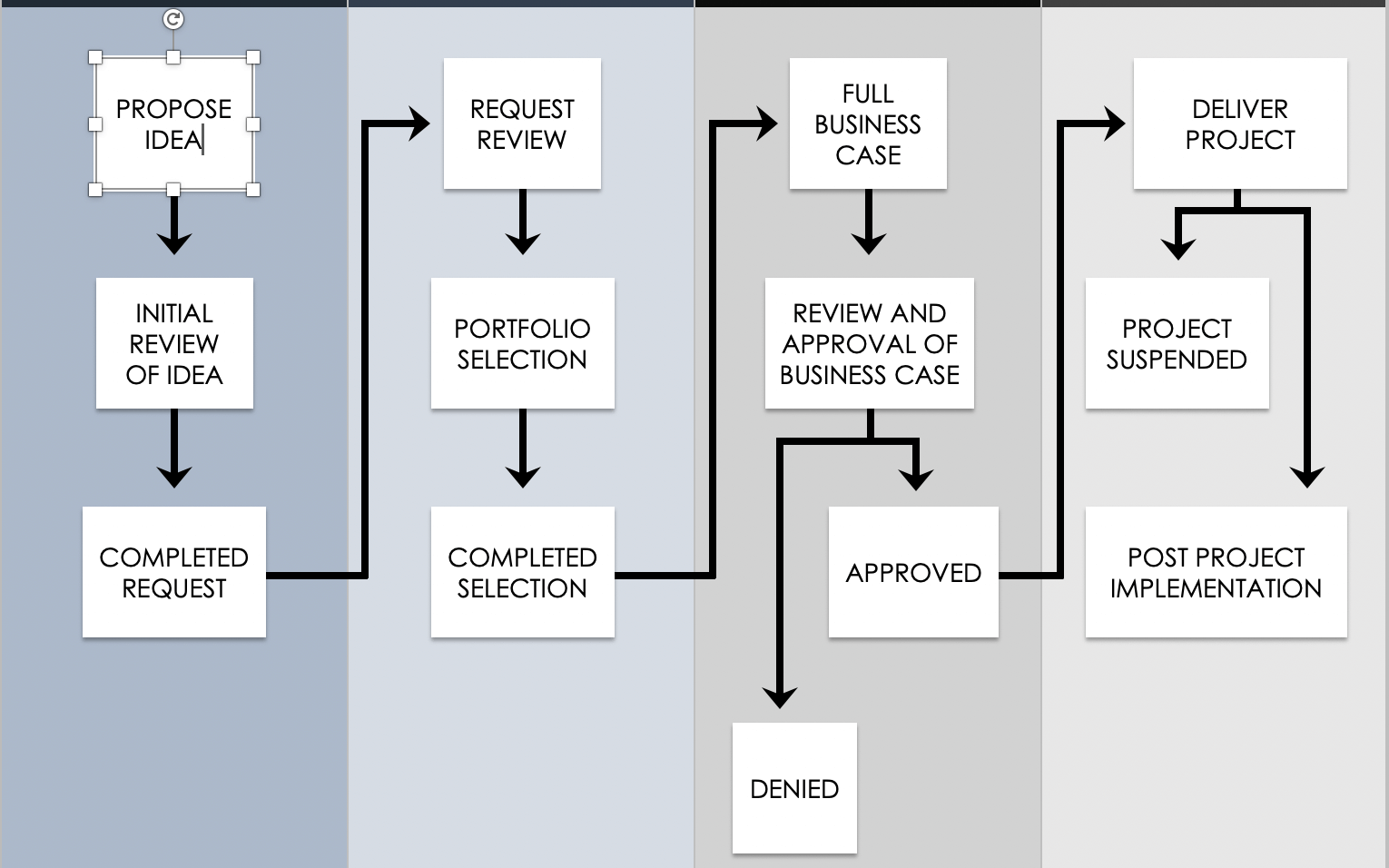
Use a process mapping tool like Lucidchart or Miro to create a visual representation of your workflow. Color-code steps by efficiency (green for smooth, red for problematic) to highlight areas that need improvement. For example, you might discover that your content creation process involves 12 steps, but 5 of them are redundant approvals that slow down publishing. This insight alone could save hundreds of hours annually.
—
Step 3: Design a Workflow That Serves Your Strategy
With your North Star defined and your current workflow mapped, it’s time to redesign for alignment. This step is where creativity meets structure. Start by asking:
- What processes are critical to achieving our North Star? (e.g., lead nurturing for sales growth)
- What can we eliminate or simplify? (e.g., unnecessary meetings, duplicate data entry)
- How can we automate repetitive tasks? (e.g., email sequences, invoice generation)
- What roles or teams need to collaborate more effectively? (e.g., cross-functional project teams)
For example, if your goal is to improve customer onboarding, your workflow might include:
- Pre-onboarding: Automated welcome emails with a checklist of next steps.
- Onboarding: A structured 30-day plan with milestones, assigned to a dedicated onboarding specialist.
- Post-onboarding: Scheduled check-ins at 30, 60, and 90 days to ensure retention.
Use a workflow diagram to outline this new process, ensuring each step ties back to your strategic goals. Tools like Backbone America offer templates for building business workflows that are both scalable and adaptable.

—
Step 4: Implement with Precision (and Patience)
Designing a strategy-first workflow is one thing; implementing it effectively is another. The key to success lies in phased rollouts, clear communication, and continuous feedback.
Phase 1: Pilot Testing
Start with a small team or a single project to test your new workflow. This minimizes risk and allows you to gather real-world data. For example, if you’re redesigning your sales process, pilot it with your top-performing sales rep first. Track metrics like time-to-close, lead conversion rates, and customer satisfaction. Are the new steps improving efficiency, or are they adding friction?
Phase 2: Training and Adoption
A workflow is only as good as the people using it. Invest in training to ensure your team understands why the new process matters and how to execute it. Use a mix of formats—workshops, video tutorials, and quick-reference guides—to cater to different learning styles. For instance, a sales team might benefit from a live demo of the new CRM workflow, while a marketing team might prefer a written playbook.
Phase 3: Iterate Based on Feedback
No workflow is perfect on the first try. Schedule regular check-ins to gather feedback from your team. Ask:
- What’s working well?
- What feels clunky or unnecessary?
- Are there steps that are causing delays?
Use this feedback to refine your workflow. For example, you might discover that a two-step approval process is slowing down content publishing, so you streamline it to a single sign-off.
—
Step 5: Measure, Optimize, and Scale
A strategy-first workflow isn’t static—it’s a living system that evolves with your business. To ensure it continues to drive results, you need to measure, optimize, and scale.
Measure: Track KPIs that align with your North Star. For example, if your goal is to reduce customer churn, monitor metrics like churn rate, customer satisfaction scores, and support ticket volume. Use dashboards in tools like Tableau or Power BI to visualize progress in real time.
Optimize: Regularly audit your workflow for inefficiencies. Ask:
- Are there tasks that no longer serve our goals?
- Have our priorities shifted, requiring a workflow redesign?
- Are there new tools or technologies that could improve efficiency?
For example, if your team is spending 20 hours a week on manual reporting, consider automating it with a tool like Zapier or Airtable.
Scale: Once your workflow is optimized, it’s time to scale. This might mean rolling it out to additional teams, expanding to new markets, or integrating it with other systems. For example, if your onboarding workflow is successful, replicate it for a new product line or geographic region. Document the process in a playbook to ensure consistency across the organization.
—
Common Pitfalls and How to Avoid Them
Even the best-laid plans can go awry. Here are some common pitfalls to watch for—and how to sidestep them:
Pitfall 1: Overcomplicating the Workflow
Solution: Start simple. Focus on the 20% of processes that drive 80% of results. Avoid adding steps “just in case”—every element should have a clear purpose.
Pitfall 2: Ignoring Team Buy-In
Solution: Involve your team in the design process. When people feel heard, they’re more likely to adopt the workflow. Host brainstorming sessions to gather input on pain points and improvements.
Pitfall 3: Failing to Align Tools with Workflow
Solution: Your tools should enable your workflow, not hinder it. For example, if your CRM doesn’t integrate with your email marketing platform, you’ll waste time manually transferring data. Choose tools that play well together.
Pitfall 4: Neglecting to Document the Workflow
Solution: A workflow without documentation is a recipe for chaos. Create a centralized playbook that outlines every step, including roles, responsibilities, and tools. Update it regularly as processes evolve.
—
The Future of Strategy-First Workflows
The business landscape is evolving faster than ever, and workflows must keep pace. The future of strategy-first workflows lies in adaptability, automation, and intelligence.
Adaptability: Workflows will need to be more flexible to accommodate remote work, global teams, and rapid market changes. Expect to see a rise in dynamic workflows that adjust in real time based on data and feedback.
Automation: AI and machine learning will play a bigger role in automating routine tasks, from scheduling to decision-making. For example, AI could analyze customer data to automatically prioritize leads in a sales workflow.
Intelligence: Workflows will become smarter, using predictive analytics to anticipate bottlenecks and suggest optimizations. Imagine a workflow that not only tracks your progress but also recommends the most efficient path forward based on historical data.
The organizations that thrive in this future will be those that treat their workflows as strategic assets—not just operational necessities. By building workflows that are aligned, efficient, and adaptable, you’ll turn strategy into action and action into results.
Leave a comment