


Every thriving business operates on a foundation of well-structured workflows. A smooth workflow eliminates bottlenecks, reduces errors, and ensures that every team member knows their role in the bigger picture. But building an effective workflow isn’t just about following a checklist—it’s about designing a system that adapts to your business’s unique needs while fostering efficiency and clarity. Whether you’re streamlining daily operations or scaling for growth, the right workflow can be the difference between chaos and seamless execution.
In this guide, we’ll explore the essential steps to create a business workflow that not only works but evolves with your organization. From identifying pain points to implementing automation, we’ll cover the strategies that turn fragmented processes into a well-oiled machine.
Understanding the Core Components of a Business Workflow
A business workflow is more than a sequence of tasks—it’s a living system that connects people, processes, and tools to achieve a specific goal. At its heart, a workflow consists of three key components:
- Inputs: The resources, data, or requests that initiate the workflow. This could be a customer order, a project brief, or an internal approval request.
- Processes: The structured steps that transform inputs into outputs. These steps should be clear, repeatable, and measurable to ensure consistency.
- Outputs: The end result of the workflow, whether it’s a delivered product, a completed report, or a satisfied client.
For example, consider an e-commerce business’s order fulfillment process. The input is a customer’s purchase, the processes include order picking, packing, and shipping, and the output is the product delivered to the customer’s doorstep. A well-designed workflow ensures each of these stages is optimized for speed and accuracy.
To build a workflow that runs smoothly, start by mapping out these components. Identify where delays occur, where errors are most likely, and where manual intervention slows things down. This foundational understanding will guide every decision in the workflow design process.

Types of Workflows Every Business Should Consider
Not all workflows are created equal. The type of workflow you design depends on your business’s goals, industry, and operational complexity. Here are the most common types of workflows and their applications:
- Sequential Workflows: Tasks are completed in a linear, step-by-step order. Ideal for processes like invoice approvals or employee onboarding, where each step must be completed before moving to the next.
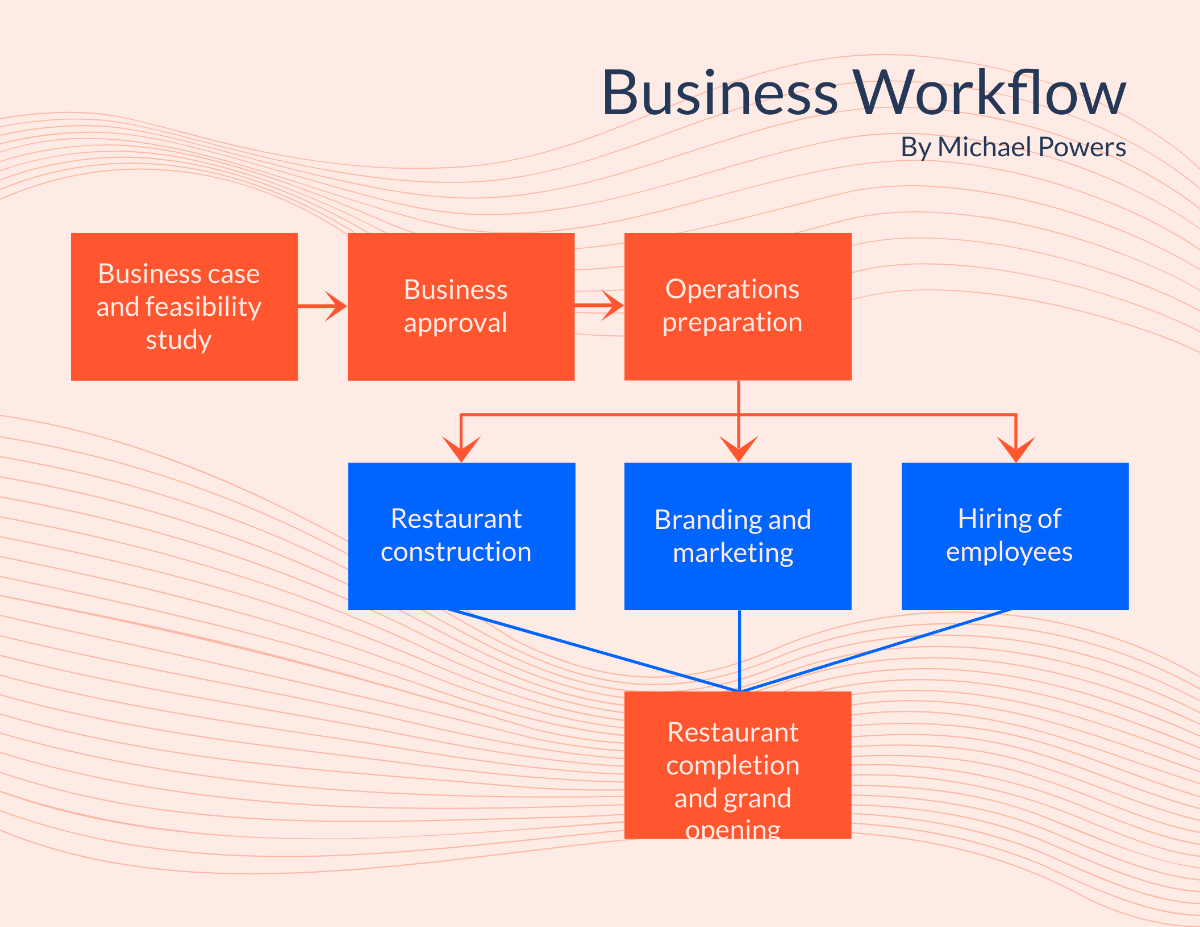
- Parallel Workflows: Multiple tasks are performed simultaneously, reducing overall completion time. Useful in project management, where different teams can work on distinct phases of a project at the same time.
- Rule-Based Workflows: Automated decisions are made based on predefined criteria. For instance, an expense report workflow might automatically route approvals to a manager if the amount exceeds a certain threshold.
- Ad Hoc Workflows: Flexible and dynamic, these workflows adapt to unique or unpredictable situations. Common in creative industries or crisis management, where standard processes may not apply.
Choosing the right type of workflow for your business ensures that your processes are both efficient and scalable. A sequential workflow might work for a small retail operation, but a parallel workflow could be more effective for a software development team juggling multiple sprints.
Step-by-Step Guide to Designing Your Ideal Workflow
Designing a workflow that runs smoothly requires a methodical approach. Follow these steps to create a system that aligns with your business objectives and enhances productivity.
Step 1: Identify the Problem and Define the Goal
Before you can design a workflow, you need to understand why it’s necessary. Start by asking:
- What problem are we trying to solve? (e.g., slow order processing, high error rates in reports)
- What is the desired outcome? (e.g., faster delivery times, fewer mistakes)
- Who are the stakeholders involved? (e.g., sales team, warehouse staff, customers)
For example, if your customer service team is overwhelmed with support tickets, the goal might be to reduce response times by 30% within three months. Defining the problem and goal upfront ensures that your workflow design remains focused and measurable.
Step 2: Map Out the Current Process
Document the existing workflow, even if it’s informal or undocumented. Use tools like flowcharts, swimlane diagrams, or simple whiteboard sketches to visualize each step. Include:
- Every task and decision point
- Who is responsible for each step
- Where bottlenecks or delays occur
- Any redundant or unnecessary steps
This exercise often reveals inefficiencies that weren’t immediately obvious. For instance, you might discover that approvals are stuck in someone’s inbox for days because they’re waiting for a signature that never comes.
Step 3: Simplify and Optimize
With the current process mapped, it’s time to streamline. Look for opportunities to:
- Eliminate redundant steps: If a task doesn’t add value, remove it.
- Automate repetitive tasks: Use software to handle data entry, notifications, or approvals.
- Standardize procedures: Create templates or checklists to ensure consistency.
- Delegate effectively: Assign tasks based on team members’ strengths and workloads.
For example, if your marketing team spends hours manually formatting social media posts, a scheduling tool like Buffer or Hootsuite can automate the process, freeing up time for strategy and creativity.
Step 4: Test and Refine
A workflow isn’t set in stone—it should evolve as your business grows. After implementing your new workflow, test it with a small group or a single project. Gather feedback from team members and track key performance indicators (KPIs) such as:
- Time saved per task
- Error rates before and after
- Employee satisfaction or workload distribution
Use this data to refine the workflow. If a step is still causing delays, revisit the process and make adjustments. Continuous improvement is the hallmark of a truly effective workflow.
Tools and Technologies to Supercharge Your Workflow
Even the best-designed workflow can fall apart without the right tools. Fortunately, there’s no shortage of software designed to streamline operations, automate tasks, and improve collaboration. Here are some of the most effective tools for different workflow needs:
Project Management Platforms
Tools like Asana, Trello, and Monday.com help teams organize tasks, set deadlines, and track progress in real time. These platforms are ideal for managing complex projects with multiple stakeholders and dependencies.
For example, a marketing team can use Trello to create boards for each campaign, with lists for planning, content creation, and review. Team members can drag tasks to different stages as they’re completed, providing transparency and accountability.
Automation Software
Automation tools like Zapier, Make (formerly Integromat), and Microsoft Power Automate connect your favorite apps and automate repetitive tasks. Imagine a workflow where a new lead in your CRM automatically triggers a welcome email sequence or a Slack notification to your sales team.
The key to successful automation is identifying tasks that are rule-based and time-consuming. By offloading these to software, you free up your team to focus on high-value work.
Communication and Collaboration Tools
Clear communication is the backbone of any workflow. Tools like Slack, Microsoft Teams, and Notion keep teams connected, whether they’re in the same office or spread across the globe.
For instance, a remote development team can use Slack to discuss code changes in real time, while Notion serves as a centralized hub for documentation, meeting notes, and project updates. These tools reduce the need for lengthy email chains and ensure everyone stays on the same page.
Document Management Systems
Keeping track of documents can be a workflow nightmare without the right system. Tools like Google Drive, Dropbox, and Confluence allow teams to store, share, and collaborate on files securely.
A well-organized document management system ensures that team members can access the information they need without digging through cluttered inboxes or shared drives. Version control features also prevent the chaos of multiple file iterations.

Common Workflow Pitfalls and How to Avoid Them
Even the most carefully designed workflows can encounter challenges. Being aware of common pitfalls will help you navigate them before they derail your operations.
Overcomplicating the Process
It’s easy to fall into the trap of adding too many steps or approval layers. While detail is important, an overly complex workflow can slow down productivity and frustrate your team. Keep it simple by focusing on the essential steps and eliminating anything that doesn’t directly contribute to the goal.
Ask yourself: Does this step add value, or is it just adding time?
Ignoring Employee Feedback
Your team members are the ones executing the workflow daily, so their input is invaluable. If they find a process cumbersome or confusing, it’s a sign that the workflow needs adjustment. Foster a culture of open communication where feedback is encouraged and acted upon.
Failing to Document the Workflow
An undocumented workflow is a recipe for inconsistency. Without clear guidelines, team members may interpret steps differently, leading to errors and inefficiencies. Document your workflow in a shared space where everyone can access it, and update it regularly as processes evolve.
Resisting Automation
Some businesses hesitate to automate workflows due to concerns about job security or a preference for manual processes. However, automation isn’t about replacing humans—it’s about freeing them from repetitive tasks so they can focus on strategic work. Start small by automating one or two processes and measure the impact before scaling up.
Not Measuring Performance
A workflow without metrics is like driving blindfolded. To ensure your workflow is effective, track KPIs such as completion time, error rates, and employee satisfaction. Use this data to identify areas for improvement and celebrate successes.
Real-World Examples of Successful Workflow Transformations
Learning from businesses that have successfully optimized their workflows can provide valuable insights. Here are a few examples across different industries:
E-Commerce: Streamlining Order Fulfillment
A mid-sized online retailer struggled with slow order processing and high error rates in shipping. By mapping their workflow, they identified that manual data entry was a major bottleneck. They implemented an automated order management system that integrated with their inventory and shipping platforms. The result? Orders were processed 40% faster, and errors dropped by 60%.
Healthcare: Improving Patient Check-In
A busy medical practice faced long wait times due to inefficient patient check-in processes. They introduced a digital check-in system where patients could fill out forms online before their appointment. This reduced front-desk congestion and allowed staff to focus on providing care rather than administrative tasks.
Manufacturing: Reducing Production Delays
A factory producing custom furniture relied on a paper-based workflow for order tracking. Delays were common due to miscommunication between the sales, design, and production teams. By switching to a cloud-based project management tool, they created a centralized system where all teams could track orders in real time. Production delays decreased by 30%, and customer satisfaction improved.
These examples highlight the power of a well-designed workflow to transform operations, regardless of industry. The key takeaway? Start with a clear goal, involve your team in the process, and be willing to adapt as you learn what works best.
Building a Workflow That Scales with Your Business
A workflow that works today may not be sufficient for your business in a year—or even six months from now. Scalability should be a core consideration from the outset. Here’s how to design a workflow that grows with your business:
Modular Design
Break your workflow into smaller, independent modules that can be adjusted or replaced without overhauling the entire system. For example, if your customer onboarding process includes a manual contract review step, consider automating this with e-signature software. This change won’t disrupt the rest of the workflow.
Flexible Tools
Choose software and platforms that can scale with your business. Cloud-based tools like Salesforce, HubSpot, and Zoho offer customizable workflows and integrations that adapt as your needs change. Avoid tools with rigid structures that can’t accommodate growth.
Regular Reviews
Set a schedule to review your workflows quarterly or biannually. Ask:
- Are there new bottlenecks?
- Have our goals or priorities shifted?
- Are there tools or technologies we should be leveraging?
This proactive approach ensures your workflows remain aligned with your business objectives and continue to drive efficiency.
Employee Training and Adaptability
As workflows evolve, so should your team’s skills. Invest in training programs to ensure employees are comfortable with new tools and processes. Encourage a culture of adaptability, where team members are empowered to suggest improvements and experiment with new methods.
By building scalability into your workflow design, you future-proof your operations and position your business for sustainable growth.
Final Thoughts: The Path to a Smooth-Running Business
A business workflow isn’t a static document—it’s a dynamic system that should evolve alongside your organization. By understanding the core components, designing with intention, leveraging the right tools, and staying adaptable, you can create workflows that not only run smoothly but also drive innovation and growth.
The journey to an optimized workflow begins with a single step: identifying the problem and committing to improvement. Whether you’re a startup founder, a department head, or a team leader, the principles outlined in this guide will help you build processes that empower your team and delight your customers.
Start small, iterate often, and never stop refining. The result will be a business that operates with clarity, efficiency, and resilience—no matter what challenges lie ahead.
Leave a comment