


In an era where digital interactions define productivity, personal AI assistants have evolved from simple chatbots into sophisticated systems capable of managing schedules, automating tasks, and even anticipating needs. Whether you’re a developer, entrepreneur, or tech enthusiast, building a personal AI assistant can unlock new levels of efficiency and innovation. This guide explores the key components, technologies, and strategies to create a robust AI assistant tailored to your needs.
The Evolution of Personal AI Assistants
Personal AI assistants have undergone a remarkable transformation since the early days of basic voice commands. Initially designed for simple tasks like setting reminders or answering questions, modern assistants now integrate natural language processing (NLP), machine learning, and contextual understanding to deliver personalized experiences. Today’s systems can analyze user behavior, predict preferences, and even engage in meaningful conversations. This evolution reflects advancements in AI, cloud computing, and data analytics, making it possible to build assistants that feel intuitive and responsive.
Core Components of an AI Assistant System
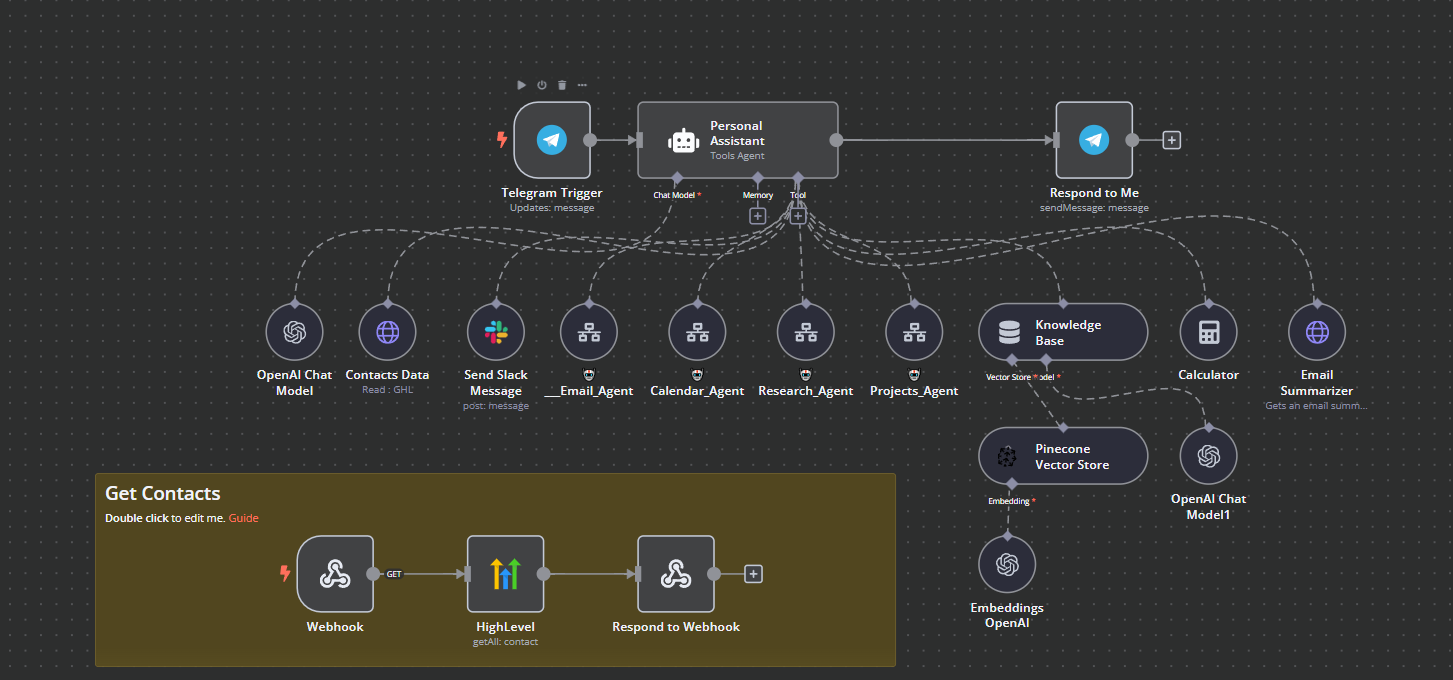
Building a personal AI assistant requires integrating several foundational components. At its core, the system relies on natural language processing (NLP) to interpret user inputs, whether through text or voice. Machine learning models enable the assistant to learn from interactions and improve over time. Data storage and retrieval systems, such as vector databases, allow the assistant to access relevant information quickly. Additionally, APIs and integrations with third-party services (e.g., calendars, emails, smart devices) expand the assistant’s functionality. Finally, a user interface—whether a web app, mobile app, or voice interface—ensures seamless interaction.
Choosing the Right AI Framework
Selecting the appropriate AI framework is critical to the success of your assistant. Popular options include TensorFlow and PyTorch for custom model development, while Rasa and Dialogflow offer pre-built NLP capabilities for conversational AI. For developers seeking a balance between flexibility and ease of use, LangChain provides tools to integrate large language models (LLMs) with external data sources. The choice depends on your technical expertise, project scope, and scalability requirements. Cloud-based solutions like AWS Lex or Google Dialogflow CX can also reduce development time by handling infrastructure management.

Designing the User Experience
A well-designed user experience (UX) ensures your AI assistant is both functional and engaging. Start by defining the assistant’s personality—whether it’s professional, friendly, or humorous—to align with your target audience. The interface should prioritize clarity, with intuitive navigation for both voice and text interactions. Incorporate features like contextual suggestions, where the assistant proactively offers help based on user behavior, and multi-modal input, allowing users to switch between voice commands and text. Testing with real users early in the design process can reveal pain points and refine the experience.
Integrating Natural Language Processing (NLP)
NLP is the backbone of any AI assistant, enabling it to understand and respond to human language. Key NLP tasks include intent recognition (identifying the user’s goal), entity extraction (pulling out relevant details like dates or names), and sentiment analysis (gauging user emotions). Libraries like spaCy and NLTK provide tools for these tasks, while cloud-based NLP services (e.g., Google Natural Language API) offer scalable solutions. For advanced applications, fine-tuning a pre-trained model like BERT or RoBERTa can significantly improve accuracy in understanding nuanced queries.
Leveraging Machine Learning for Personalization
Machine learning enables your AI assistant to adapt to individual users over time. By analyzing interaction patterns, the system can predict preferences, such as preferred meeting times or frequently accessed information. Techniques like reinforcement learning allow the assistant to optimize responses based on user feedback, while collaborative filtering can recommend actions similar to those taken by other users with comparable profiles. Privacy is paramount here; ensure data collection complies with regulations like GDPR and implement anonymization where possible to protect user information.
Connecting to External Data Sources
A truly useful AI assistant doesn’t operate in isolation—it thrives on data. Integrating with APIs for calendar management (e.g., Google Calendar), email services (e.g., Gmail), and productivity tools (e.g., Trello) allows the assistant to perform tasks like scheduling meetings or summarizing emails. For more advanced use cases, vector databases (e.g., Pinecone, Weaviate) enable semantic search, where the assistant retrieves information based on meaning rather than exact keywords. This is particularly useful for assistants designed to answer domain-specific questions, such as legal or medical queries.
Ensuring Security and Privacy
Security is non-negotiable when building an AI assistant, especially one that handles sensitive data. Implement end-to-end encryption for all communications and store user data in secure, compliant environments. Use authentication protocols like OAuth 2.0 to control access and regularly audit permissions. For voice assistants, consider adding wake-word detection to prevent unauthorized activation. Transparency is also key—clearly communicate how data is used and provide users with controls to manage their information, including options to delete data or opt out of certain features.
Testing and Iterating for Reliability
A robust AI assistant requires rigorous testing to ensure reliability and accuracy. Start with unit testing for individual components like NLP models and API integrations. User acceptance testing (UAT) involves real users interacting with the assistant to identify usability issues. Load testing ensures the system can handle high volumes of requests without performance degradation. Additionally, A/B testing can help refine features by comparing different versions of the assistant’s responses or interface. Continuous monitoring post-launch is essential to catch issues early and improve the system based on real-world usage.
Scaling Your AI Assistant
As your AI assistant gains traction, scaling becomes a priority. Cloud services like AWS Lambda or Google Cloud Functions can handle increased traffic by dynamically allocating resources. For global audiences, consider deploying edge computing solutions to reduce latency. Optimize your database queries and caching strategies to improve response times. If your assistant relies on machine learning, explore model quantization or distributed training to speed up inference and reduce computational costs. Scaling also involves planning for redundancy and failover systems to ensure high availability.
Future-Proofing Your AI Assistant
The field of AI is rapidly evolving, and future-proofing your assistant requires staying ahead of trends. Keep an eye on advancements in large language models (LLMs), which are becoming more efficient and capable of handling complex tasks. Explore multimodal AI, where assistants can process and generate not just text but also images, audio, and video. Additionally, consider integrating federated learning to improve personalization without compromising user privacy. Regularly updating your assistant’s knowledge base and retraining models will ensure it remains relevant and useful.
Real-World Applications and Use Cases
Personal AI assistants are transforming industries by automating repetitive tasks and providing insights. In healthcare, assistants can schedule appointments, remind patients to take medication, and even analyze symptoms. For businesses, they streamline customer support by handling routine inquiries and routing complex issues to human agents. In education, AI tutors provide personalized learning experiences, adapting to each student’s pace and style. Home automation is another growing area, where assistants control smart devices, manage energy usage, and enhance security. The possibilities are limited only by creativity and technical constraints.
Getting Started: A Step-by-Step Roadmap
Building your first AI assistant can feel daunting, but breaking the process into manageable steps makes it achievable. Start by defining the assistant’s core functionality—will it focus on productivity, entertainment, or a specific industry? Next, choose your tools and frameworks, whether you’re using a no-code platform or developing from scratch. Prototype a basic version with core features like NLP and a simple UI, then iterate based on user feedback. Gradually add advanced capabilities, such as integrations or machine learning models, and test each addition thoroughly. Finally, deploy your assistant in a controlled environment, monitor its performance, and scale as needed.
Conclusion: The Path to a Smarter Future
Creating a personal AI assistant is more than a technical challenge—it’s an opportunity to redefine how we interact with technology. By combining NLP, machine learning, and seamless integrations, you can build an assistant that not only understands commands but also anticipates needs and enhances productivity. As AI continues to advance, the potential for these systems will only grow, making now the perfect time to embark on this journey. Whether you’re building for personal use or a broader audience, the key is to start small, iterate often, and prioritize user experience above all else.
Leave a comment